The registry is the shared service that holds your organization's playbook. It is one Go binary. The binary stores the techniques, measures the outcomes, serves the dashboard, and answers your colleagues' harnesses. This chapter is for the person who sets up the registry. If you only want to connect to a registry that exists, go to Join your organization's registry.
Install OpenTacit
Download the latest release. The installer checks the checksums before it changes anything:
curl -fsSL https://opentacit.com/install.sh | shBootstrap the registry
Run:
tacit inittacit init is idempotent: it adds only what is absent, and it explains each item that it sets up. In one pass it:
- Writes the registry configuration to
~/.config/tacit/registry.envand creates an API key (OpenTacit shows the key one time; treat it as a secret) - Creates the data directory and adds a starter set of techniques
- Downloads the semantic retrieval model (about 90 MB). The model matches techniques by meaning, not by keyword overlap
- Signs this machine's operator in as the registry's owner, and prints a sign-in link for the dashboard. A registry that already uses an identity provider keeps it; nothing is added
- Gives the registry an address on the internet, through the shared OpenTacit proxy, so you can open the dashboard from a laptop or a phone rather than only from the machine it runs on. Your techniques stay put: contributing them to the public pool is a separate yes, in Settings, asked for when a technique is actually eligible. See The address
- Reads this repository's written conventions into the review queue. If you run the command inside a checkout, OpenTacit reads
CLAUDE.md,AGENTS.md,.cursorrules, the copilot instructions, and the skills, commands and prompts under.claude/— and files each rule as a draft technique. Nothing serves: a draft reaches nobody until you promote it. See Where your first techniques come from - Prints the dashboard address and the instructions for your first members
- Says whether a model API key is configured, and what one buys
Then, if you are at a terminal, it serves the registry: it stays in the foreground, prints the sign-in link once the registry answers, and stops with Ctrl-C. Run the command again to serve the same registry at the same address. In a script it configures and returns, and tells you how to start it.
It installs no service. A registry with one member is one you start when you want it. The service that keeps a registry up through a reboot belongs to a registry other people sign in to, and turning on sign-in installs it for you. If you are standing up a server and know from the start that yours is that kind, ask for it: tacit init --service auto.
The owner signs in from this machine and needs no identity provider. When you are ready for one, turn on sign-in — the registry keeps its address, its data, and its members.
You can control each step with flags:
| Flag | Values | What it controls |
|---|---|---|
--embeddings | on, off, auto | Controls the download of the semantic retrieval model. With auto (the default), OpenTacit downloads it on platforms that support it. On other platforms, OpenTacit uses the built-in lexical matcher. |
--service | systemd, launchd, none, auto | How the registry stays in operation. With none, run it in the foreground yourself with tacit serve. |
--port | a port number | The port to serve on. The default is 8080. |
--from-repo | auto, off, a path | Which repository's conventions to read into the review queue. With auto (the default), the working directory when it is a checkout, and nothing otherwise. |
--global-access | on, off, auto | Whether to give the registry an address on the internet through the shared proxy. With auto (the default), on for a registry that has a sign-in, has no address of its own, and can reach the proxy. |
Note: On Linux, run loginctl enable-linger $USER so that the user service continues after you sign out.
Or run it in a container
The official image contains the same registry on a minimal (distroless) base. The image includes semantic retrieval, so there is no download at first boot:
docker run -d --name tacit -p 8080:8080 -v tacit-data:/data ghcr.io/paulsm/tacit:latest
docker logs tacit    # the first-run claim code appears here
Then claim it in the browser with the steps below. The registry writes all its data to the /data volume: settings, techniques, and the SQLite store (tacit.db, the default backend of the image). A backup of the volume is a backup of the registry. If you recreate the container, you lose nothing. An older image stored JSON files instead. If a volume comes from an older image, the registry imports the files into SQLite automatically at first boot. The registry keeps the old files in place. To upgrade, pull a newer tag and recreate the container (tacit upgrade in a container refuses and says so). A reference docker-compose.yml is in deploy/. It contains the reverse-proxy settings: TACIT_EXTERNAL_URL, and TACIT_BASE_PATH for a sub-path.
Claim the registry
If you start the registry without configuration (for example, tacit serve on a new machine), it enters first-run setup and does not serve. The console prints a claim code. Every page redirects to a setup form.
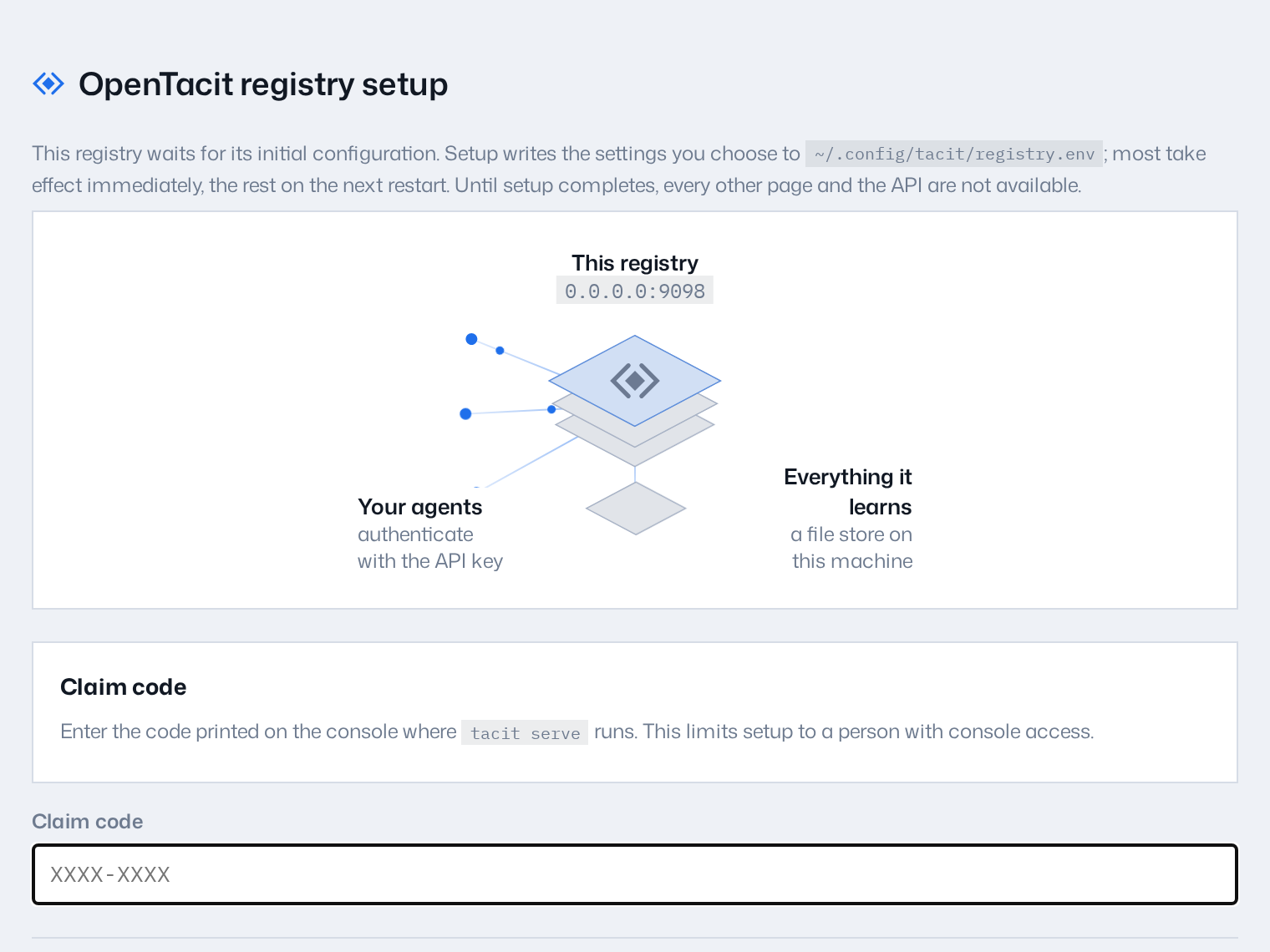
- Open
http://localhost:8080/setupin your browser. - Enter the claim code from the console.
- Click Configure registry.
That is the whole form. Every other setting has a default that works, and they are all in one Advanced settings disclosure below the claim code if you need them now: the API key and external URL, the address to serve on, storage, sign-in, administrator emails, federation identity, and the embedder and model API key. Settings can change any of them later.
OpenTacit validates what you gave it, writes it to registry.env, applies what it can immediately, and tells you if a setting needs a restart.
The confirmation page shows the generated API key one time. If you did not configure an identity provider, the claim also makes you the registry's owner — the same gate tacit init sets up — so run tacit dashboard on the console for a sign-in link.
Turn on sign-in
A new registry signs one person in: you, its owner, proved by access to the machine it runs on. That is right for a pilot and for a registry only you use. When colleagues need to sign in with their own accounts, configure OIDC with your identity provider (Google, Okta, and similar providers).
If the registry is yours alone and you are signed in with the owner link, do it from the dashboard: Settings → Access & sign-in, and move the Sign-in switch from Personal to Shared. The page tells you the callback URL to register with your provider, takes the client that you make there, and — on Save changes — restarts the registry so the settings take effect.
The console does the same thing, and is the only way when the dashboard has no administrator or its sign-in is already wrong. Run tacit secure on the registry machine. The command tells you the callback URL to register with your provider, takes the client that you make there, and starts the registry as a service (systemd on Linux, launchd on macOS) so that it is up when your colleagues sign in — restarting it, if a service is already running it. A registry you are running in a terminal is yours to stop first; the command says so rather than killing a process it did not start. After that, every dashboard page asks visitors to sign in with their organization account. Use --admins (or TACIT_ADMIN_EMAILS) to limit administrative actions to specific people, and tacit secure --off if you must open the dashboard again. The steps, and the registry.env settings behind them, are in Turn on sign-in.
The address
tacit init gives a new registry an address on the internet by default, through a proxy OpenTacit runs. This is the difference between a dashboard you can open and one you cannot: without it the only sign-in link is to the machine's own loopback address, and a registry set up on a server over SSH has no way in at all until somebody forwards a port.
Three things are worth knowing about it.
The proxy terminates TLS. It can read what passes through it. If that is not acceptable for your organization, use your own address instead — set TACIT_EXTERNAL_URL — or run tacit init --global-access off and reach the registry over your own network.
Your techniques do not move. The switch has a second half: a feed of this registry's strongest general techniques to a public pool shared with other organizations. tacit init does not turn that on and cannot — only a person ticking the box in Settings → Access & sign-in does. A new registry has nothing eligible for it in any case, because a technique reaches the pool only after your colleagues' outcomes clear its evidence floor. OpenTacit asks when the first one does, and shows you exactly which techniques it covers.
It needs a sign-in. OpenTacit will not put a public address in front of a dashboard anybody can read. tacit init sets up owner sign-in, so this is already true; a registry with neither owner sign-in nor an identity provider keeps a local address until it has one.
tacit init also declines the address when it cannot reach the proxy, so an air-gapped or offline install stays local rather than retrying a connection forever. Turn it on later in Settings when the network is there.
Make it reachable another way
A registry on a laptop or an internal network is available to the people who can reach that machine. If you turned the shared proxy off, there are two other ways to open it more widely.
Use the proxy that your organization already has — a reverse proxy or a tunnel. Set TACIT_EXTERNAL_URL to the address that members will use. Then invites, links, and sign-in redirects carry that address. The registry can have its own hostname, or it can share one under a sub-path (https://demo.example.com/apps/tacit). A sub-path also needs TACIT_BASE_PATH. See Serve under a sub-path.
Or turn the shared proxy back on. One switch in Settings → Access & sign-in, or one line:
TACIT_GLOBAL_ACCESS=1See The address above for what the proxy can see and what stays here, and Publish through the OpenTacit proxy for the effects on you and on your members.
Check the health
tacit doctortacit doctor checks the service, the permissions of the configuration file, the API key, and the embedder. It reports each check as ok, a warning, or a failure with the fix. See Troubleshooting.
Where your first techniques come from
A registry with nothing in it has nothing to offer, and waiting for the loop to fill one takes weeks. So OpenTacit starts from what your organization has already written down.
Run tacit init inside a repository and it reads the files where your teams record how to work with agents:
| File | What OpenTacit takes from it |
|---|---|
CLAUDE.md, AGENTS.md, GEMINI.md, CONVENTIONS.md | one draft per section, or per rule when the file is a list |
.cursorrules, .github/copilot-instructions.md | the same |
.claude/skills/*/SKILL.md, .claude/commands/*.md | one draft each — a skill is one move |
.cursor/rules/*, prompts/*.md | one draft each |
Each draft carries the file and section it came from, so you can go and read the original. They are org-scoped, because a convention your organization wrote is exactly the knowledge no public source has. They are drafts: retrieval never serves one, and nothing reaches a colleague until you promote it on the Review page.
A pass files at most 25, and re-running tacit init in the same checkout recognises what it already read rather than filing it twice. To skip the step, run tacit init --from-repo off; to point it at a different checkout, give it a path.
There is no model involved. OpenTacit quotes your own words and lets you decide what is a technique — editing a draft into a sharper one is the Review page's job, and the research pass is what a model does for you later.
Try it with demonstration data
You can see the dashboard in operation before real usage arrives. Load one month of simulated organization activity into a scratch registry:
tacit demo loadIf a registry already holds real content, the demo driver refuses to load into it, unless you pass --force. Run tacit demo scenarios to list the available scenarios.
Invite your first members
Create a join link and send it to a colleague:
tacit inviteThe link installs OpenTacit, joins the registry, and wires their harnesses in one step. Links expire after 24 hours by default. Each person who has the link can join. Thus give the link the same protection as a password-reset link. You can also add --repo to commit a small marker file to a repository. Colleagues who open that repository then get an automatic invitation to join. The dashboard's Members page gives the same tools in the browser.
File locations
| Path | What it is |
|---|---|
~/.config/tacit/registry.env | Registry configuration (KEY=VALUE; environment variables override it) |
~/.local/share/tacit/data/ | The embedded file store: techniques, events, rollups |
~/.local/share/tacit/techniques/ | The curated technique directory |
~/.local/share/tacit/models/ | The semantic retrieval model |
The embedded file store needs no external services. Larger deployments can move to Postgres with tacit migrate-store. See Configure the registry.